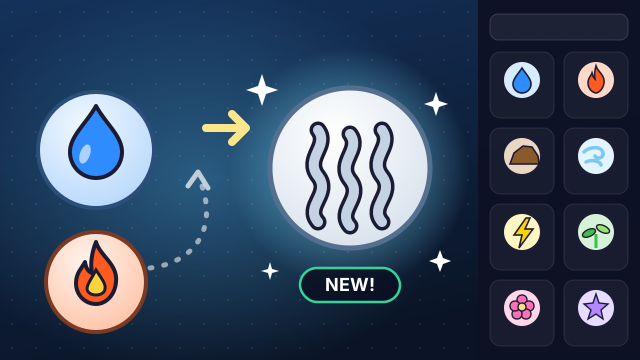
Drag to Combine! is a Roblox experience by The Pure Element, created on July 20, 2024. Every item in it is an aura: you start with four basic auras — Water, Fire, Earth and Wind — and drag one onto another in the crafting area to create something new. The simple loop caught on fast; Rolimons lists more than 30 million visits and over a million favorites for the experience.
This page explains how the Roblox game works and how to approach it, without a copied recipe list. Below the guide you can also play Aura Forge, igame9’s own browser game in the same spirit: 126 original auras across six rarity tiers, glowing rarity frames and a Fusion Altar for legendary auras. It is not the Roblox game and has no connection to Roblox, but it runs instantly in any browser — handy on a Chromebook or when you only have a few minutes.
How to play Drag to Combine Roblox
- This list covers Aura Forge, the game on this page. Press Play: Aqua, Ember, Terra and Zephyr are waiting on the workspace and in the library.
- Drag one aura onto another. A valid pair fuses into a new aura with a “New aura!” card that shows its rarity. A wrong pair bounces back to where it came from.
- Add copies by dragging tiles out of the library, tapping a library tile, or double-tapping an aura on the workspace. You can also tap one aura and then tap a second to fuse them.
- Rarity is shown by the frame colour: grey Common, green Uncommon, blue Rare, purple Epic, pink Mythic and gold Legendary.
- Legendary auras only form on the Fusion Altar (bottom right). Place one ingredient on the altar and drop the other onto it. Each try has a 50% chance; every miss adds 10% to the next try and starts a 10-second recharge. Off the altar, a legendary pair just “resonates” and tells you to use it.
- Use search, the sort button (A–Z, newest, rarity) and Hint when you’re stuck. Collect all 126 auras to complete the collection.
Drag to Combine Roblox controls
| Action | Keyboard | Mouse | Touch |
|---|---|---|---|
| Add an aura | Press /, type a name, Enter | Drag it from the library, or click it | Drag it up from the library, or tap it |
| Fuse two auras | Select with ← →, then search + Enter | Drop one aura onto another | Drag onto another, or tap one then the other |
| Legendary fusion | Select the aura on the altar, then search + Enter | Put one aura on the Fusion Altar, drop the other on it | Same, by dragging |
| Copy an aura | D | Double-click it | Double-tap it |
| Remove an aura | Delete | Drag it back to the library | Drag it back to the library |
| Hint | H | Hint button | Hint button |
| Menu & stats | Esc or M | Menu button | Menu button |
Drag to Combine Roblox tips & strategy
- Run every new aura past the four basics. In Aura Forge, as in most crafting games, many early recipes are “new aura + a basic one”, so test those pairs before anything exotic.
- Test doubles. Combining an aura with a copy of itself is a common recipe pattern — in Aura Forge, Aqua + Aqua and Terra + Terra both work.
- Follow the theme. Auras are built from ideas: weather from water and wind, celestial auras from the sky, emotions from light and shadow. If two names belong together, try them.
- Keep notes on legendary pairs. On Roblox a failed legendary fusion reportedly locks you out for a few hours, so confirm the pair and the spot first. In Aura Forge a miss costs only 10 seconds and raises your odds.
- Don’t chase shop rolls early. Unique auras on Roblox come from rolls and passes, not recipes — the crafting tree is where steady progress happens.
- Use faded tiles as a checklist. In Aura Forge a faded library tile has no undiscovered fusions left; a ★ marks an aura that isn’t used in any recipe.
How Drag to Combine! works on Roblox
The heart of the experience is the crafting area. You drag one aura onto another, and if the pair is a recipe they merge into a new aura that joins your collection, and every new aura opens more pairs to try. Community guides count around 340 auras, and the game’s description promises new elements regularly, so totals change with updates.
Not every aura comes from plain crafting. Guides describe three kinds:
- Craftable auras — made by dragging two auras together in the crafting area.
- Legendary auras — fused from two specific auras at a special location on the map, with a 50% success chance. If the fusion fails, you have to wait a cooldown of a few hours before trying again.
- Unique auras — not craftable at all. Some come with a VIP game pass (listed at 299 Robux in guides), others are rolled in the in-game shop with coins, where the rarest roll is listed at a 0.05% chance.
It is a social experience too: Rolimons lists servers of up to 35 players.
How to start playing on Roblox
- Sign in to Roblox on a computer, or open the Roblox app on a phone or tablet.
- Search for Drag to Combine! and check that the creator is The Pure Element — other aura-crafting games exist on Roblox.
- Press Play, open the crafting area and start dragging your four basic auras onto each other.
- The experience is free to play; the VIP pass and shop rolls are optional.
Because it is a Roblox experience, it needs the Roblox app or website and an account. If you just want to practise the drag-and-fuse logic in a browser tab, Aura Forge above works without either.
Aura rarity tiers in Aura Forge
In Aura Forge every aura’s rarity comes from how many fusion steps it sits from the four starters, so rarer auras are simply deeper in the tree. Legendary auras are the exception: they always need the Fusion Altar.
| Tier | Frame | Auras | How you get them |
|---|---|---|---|
| Common | Grey | 14 | The starters and their first fusions |
| Uncommon | Green | 19 | Two or three steps in, e.g. Nimbus, Frost, Obsidian, Azure |
| Rare | Blue | 32 | Four or five steps, e.g. Solar, Lunar, Tempest, Steel |
| Epic | Purple, sparkles | 23 | Six steps, e.g. Spirit, Void, Galactic, Hope |
| Mythic | Pink, sparkles | 26 | Seven or more steps, e.g. Circuit, Drake, Seraph, Paradox |
| Legendary | Gold, rays | 12 | Fusion Altar only, 50% base chance |
The Roblox game groups its auras differently — basic, craftable, legendary and unique — so treat this table as a guide to Aura Forge only.
Where to find Drag to Combine recipes
We don’t publish a Drag to Combine! recipe list here: the Roblox game adds auras over time, and an outdated or guessed list wastes your fusions — and, for legendaries, hours of cooldown. For complete, regularly updated lists, the community relies on dedicated guide sites such as Game Rant, GINX TV and Pro Game Guides. Check the date on any list before you rely on it.
For Aura Forge you won’t need a list: the Hint button points you to a working pair whenever you are stuck.
Drag to Combine Roblox FAQ
Who made Drag to Combine on Roblox?
Drag to Combine! was created by The Pure Element and published on Roblox on July 20, 2024. igame9 is not affiliated with the creator or with Roblox.
How many auras are in Drag to Combine?
Community guides count about 340 auras, including craftable, legendary and unique ones. The number changes as the game is updated.
How do legendary auras work in Drag to Combine?
According to guides, legendary auras are fused from two specific auras at a particular spot on the map. Each attempt has a 50% success chance, and a failure starts a cooldown of a few hours.
Can I play Drag to Combine without Roblox?
The original runs only on Roblox. Aura Forge on this page is a separate, original browser game in the same drag-and-fuse style that needs no account or download.
How is the Fusion Altar in Aura Forge different?
It works on the same idea but is friendlier: every attempt starts at 50%, each miss adds 10% to the next attempt, and the altar only needs 10 seconds to recharge after a failure. Your ingredients are never lost.
Is my Aura Forge progress saved?
Yes. Discovered auras, the workspace, your stats and the altar’s charge are stored in your browser’s local storage. A private window or cleared site data starts over.
Drag to Combine! is a Roblox experience created by The Pure Element, and Roblox is a trademark of Roblox Corporation. igame9 is an independent site and is not affiliated with or endorsed by The Pure Element or Roblox Corporation. The playable game on this page, Aura Forge, is an original browser game made for igame9 in a similar style; this guide describes the original for reference.