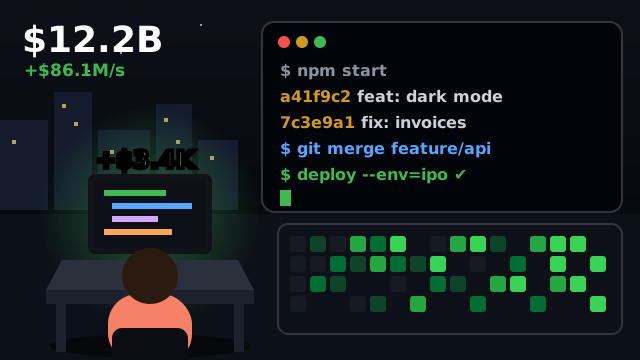
Idle Startup Tycoon is a browser idle game about building tech companies from nothing. You start with a tiny team, click to push work through the office, and earn cash that pays for more staff, managers and new businesses. Before long the money keeps flowing while you do something else, and the real decisions become what to upgrade next and when to cash out.
On this page you can play Garage to Unicorn, igame9’s own free startup idle clicker in the same spirit. You tap your desk to write code, hire everyone from interns to a synthetic co-founder, ship roadmap features, move from a garage to an IPO, and then sell the company to investors for permanent Equity. It runs in any modern browser on desktop, Chromebook and phone, with nothing to install, and saves automatically.
How to play Idle Startup Tycoon
- Write code. Click or tap the office scene, or press Space or C. Every tap earns cash, and every 25 taps ships a release that pays a bonus (the yellow bar under your desk shows progress).
- Hire a team in the Team tab. Interns, Junior Devs, Senior Devs, Designers and seven more roles each earn money every second. Every role doubles its output at 10, 25, 50, 100 and 200 hires.
- Ship features in the Roadmap tab. Each feature is a one-time upgrade: a role’s output ×2, taps ×2 or ×3, taps that earn a share of your revenue per second, or a boost to all revenue.
- Move offices in the Office tab: Garage → Shared Loft → First Office → Open-Plan Floor → Tech Campus → Skyscraper HQ → IPO Day. Each move multiplies all revenue (×1.5 to ×3) and fills the scene with more desks.
- Click the Trending! bubble when it floats past. It either triples revenue for 20 seconds or hands you an angel cheque.
- Sell the company in the Investors tab once you have earned $10M in the current run. You restart in a garage with a new startup name, but keep your Equity ★: each star adds +10% to all revenue and taps, forever.
Idle Startup Tycoon controls
| Action | Keyboard | Mouse | Touch |
|---|---|---|---|
| Write code (earn cash) | Space or C | Click the office scene | Tap the office scene |
| Hire, ship a feature, move office | — | Click the button | Tap the button |
| Change buy amount | B | ×1 / ×10 / ×25 / Max switch | ×1 / ×10 / ×25 / Max switch |
| Buy the maximum once | Shift or Ctrl | Hold Shift or Ctrl and click Hire | Select Max, then tap Hire |
| Switch tab (Team … Settings) | 1–5 | Click a tab or the NEXT box | Tap a tab or the NEXT box |
| Grab a Trending bubble | V | Click the bubble | Tap the bubble |
Idle Startup Tycoon tips & strategy
- Follow the NEXT box. It shows your next milestone with a progress bar; clicking it opens the right tab.
- Buy “Mechanical keyboard” ($60) before your first few hires. Doubling taps early speeds up the slowest part of the game, then “Free coffee” ($150) doubles every Intern.
- Check the green BEST tag. In the Team tab it marks the hire that adds the most revenue per dollar right now, milestones included.
- Fill roles up to the next milestone. The thin bar under each role counts toward its next ×2 at 10, 25, 50, 100 or 200. Buying the last few hires before a milestone is often the best deal on the board.
- Office moves are the biggest boosts. A move multiplies everything, so when the next office is within reach, save for it instead of spreading cash over small hires.
- Keep tapping after “Hot reload”. From then on each tap also earns 2% of your revenue per second (5% with “Pair programming”), so short bursts of tapping stay worthwhile late in a run.
About the original Idle Startup Tycoon
The game was made by MarketJS, an HTML5 studio that builds and licenses games for web portals; it is the same studio behind the one-button driving game Drift Boss. The game appeared on portals around the end of 2021 and is widely played on sites such as Poki, CrazyGames and Coolmath Games, using only the left mouse button or a finger.
The original is built around a production line inside a co-working tower. A programmer codes a startup idea, it moves to the cloud servers, and sales staff turn it into cash. Early on you click each station yourself to keep work moving. As money comes in you hire more workers, pay for upgrades that speed up each station, and hire managers so the line runs without you. New floors open new ventures, from a food delivery app and a mobile game studio to ridesharing, livestreaming, IoT, cybersecurity, drones, artificial intelligence and space tourism.
When growth slows, investors let you reset your progress in exchange for permanent multipliers, so the next run goes faster. It also keeps earning while left open in the background, which makes it a popular “leave it running” game.
Garage to Unicorn vs. Idle Startup Tycoon
| Original game | Garage to Unicorn (this page) | |
|---|---|---|
| Active play | Click workers to move work down the line | Tap your desk to write code; every 25 taps ships a bonus release |
| Automation | Hire managers per station | Every hire earns per second; the Commit bot perk taps for you |
| Expansion | New floors unlock new ventures | 7 office stages from a garage to IPO Day, each a revenue multiplier |
| Upgrades | Station and business upgrades | 40 roadmap features plus head-count milestones |
| Prestige | Investors reset for permanent multipliers | Sell the company for Equity ★ (+10% each) and 6 investor perks |
| Offline | Earns while running in the background | 50% speed while closed (100% with Night shift), up to 8 hours |
| Price | Free with ads on most portals | Free, no sign-up |
A fast first run: what to buy in the first 15 minutes
The opening is about turning taps into a team as quickly as possible. A path that works well:
- Minute 0–2: tap to $60, buy Mechanical keyboard, then hire Interns. Ship Free coffee as soon as it appears.
- Minute 2–5: unlock Junior Devs and get Interns to 10 for their first milestone. Move to the Shared Loft at $1K — it multiplies everything by 1.5.
- Minute 5–9: Senior Devs and Product Designers take over most of your income. Ship each role’s first feature (×2) and the Team offsite (all revenue ×1.25), then move to the First Office at $25K.
- Minute 9–15: Growth Marketers and Data Scientists arrive. Hot reload makes tapping scale with revenue, and the Open-Plan Floor ($500K) doubles everything again. Around here your run passes $10M and investors start making offers.
Timings vary with how much you tap; most first exits come after 10 to 20 minutes.
When to sell: how Equity is calculated
Selling gives Equity equal to 3 × the cube root of this run’s earnings in millions, rounded down. So $10M pays 6★, $100M pays 13★, $1B pays 30★ and $10B pays 64★. Each star is +10% on all revenue and taps, and stars are never spent.
Because the payout grows slowly while your income grows fast, the best time to sell is when progress stalls — when the next office or role is several minutes away — not the moment the button lights up. Equity also unlocks permanent perks:
| Equity | Perk |
|---|---|
| 5★ | Angel network — every new company starts with $1,000 |
| 15★ | Commit bot — 2 automatic taps per second |
| 40★ | Night shift — offline earnings at 100% instead of 50% |
| 100★ | Recruiter network — all hires 10% cheaper |
| 300★ | Media darling — Trending bubbles twice as often, boosts last 30 s |
| 1,000★ | Legend status — ×3 revenue and taps |
Idle Startup Tycoon FAQ
Is Idle Startup Tycoon free to play?
Yes. It is free on the web portals that host it, and Garage to Unicorn on this page is free too, with no download or account.
Who made Idle Startup Tycoon?
It was developed by MarketJS, an HTML5 game studio. igame9 is not affiliated with MarketJS; Garage to Unicorn is igame9’s own startup idle game in a similar style.
Does the game keep earning when I close it?
Garage to Unicorn measures the real time you were away and pays your team at 50% speed for up to 8 hours (100% after the Night shift perk). A “Welcome back” screen shows what you earned.
What happens when I sell my company?
Cash, hires, features and your office reset and you start over in a garage with a new startup name. You keep Equity ★ (+10% revenue each), investor perks and lifetime stats, so every run is faster than the last.
Is my progress saved?
Yes. It autosaves to your browser’s local storage every few seconds and when you leave. Clearing site data or a private window starts fresh; Reset progress in settings wipes it on purpose.
Can I play it on a phone or Chromebook?
Garage to Unicorn adapts to portrait phones (office on top, tabs below) and works with touch, mouse and keyboard, so it runs well on phones, tablets and school Chromebooks.
Idle Startup Tycoon is a trademark of MarketJS. igame9 is an independent site and is not affiliated with or endorsed by MarketJS. The playable game on this page, Garage to Unicorn, is an original browser game made for igame9 in a similar style; this guide describes the original for reference.